Patina AI workflows

Real watch jobs. Shown step by step.

Follow the work around a watch—from identification through selling, reporting, and health readings—with the product evidence that fits each job.

01Available now

Scan and identify a watch

Capture the watch in front of you, confirm the identification, and keep the result beside the first buying questions.

Outcome

A watch record with its identified model and a starting point for due diligence.

Open the steps
  1. 01Frame the watch and capture a scan from the mobile app.
  2. 02Review the proposed identification against the watch itself.
  3. 03Carry the identified watch into its market and acquisition questions.
Explore Scan & Appraise
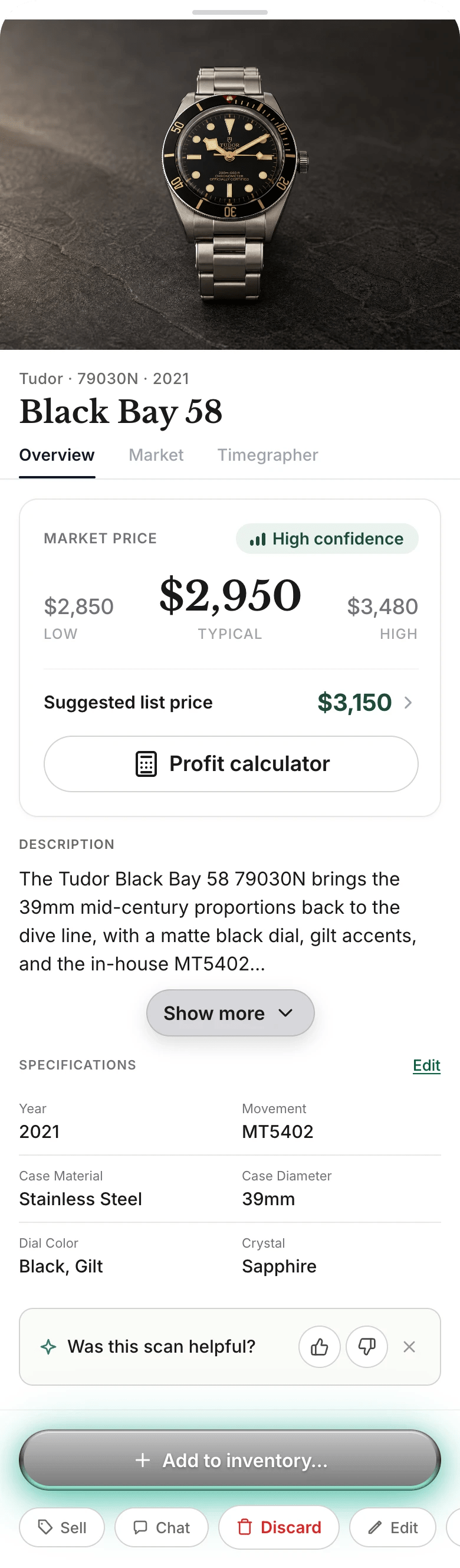
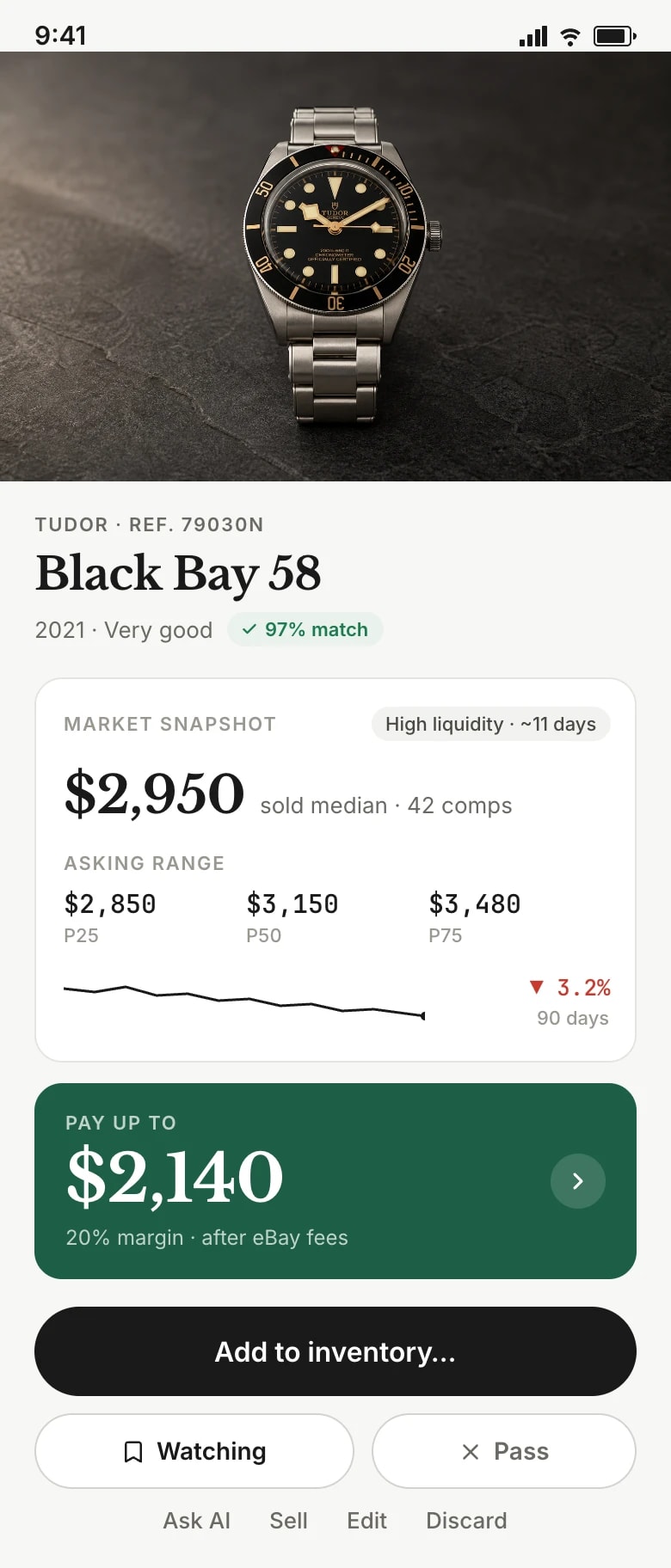
Review a Tudor Black Bay 58 buy decision with market pricing and a maximum purchase price.
Identification and first buy context
02Available now

Read the market and judge the buy

Place the asking price beside market context before deciding whether the deal deserves more time.

Outcome

A clearer buy-or-pass decision grounded in the available market context.

Open the steps
  1. 01Open the watch’s market view after confirming the reference.
  2. 02Compare the seller’s ask with the displayed market range.
  3. 03Treat the context as a decision input, then decide whether to pursue the watch.
Explore Market Intelligence
Scout a Tudor Black Bay 58 with a market price range, suggested list price, and profit calculator.
Market range detail
03Available now

Calculate a target acquisition price

Work from a considered exit assumption and deal costs to establish the price discipline a purchase needs.

Outcome

A target acquisition price to use in a negotiation, not a promised resale result.

Open the steps
  1. 01Review the current market context and your intended selling path.
  2. 02Add the costs and room the deal must carry.
  3. 03Use the maximum buy guidance to set a negotiation boundary.
Explore Market Intelligence
Review a Tudor Black Bay 58 buy decision with market pricing and a maximum purchase price.
Maximum-buy decision
04Available now

Add a watch to inventory

Move an identified watch into a connected inventory record with a clear lifecycle state.

Outcome

An inventory record that keeps the watch’s working details and state together.

Open the steps
  1. 01Create a watch record from the confirmed watch details.
  2. 02Set the record’s current lifecycle state.
  3. 03Review the collection with the watch’s market context nearby.
Explore Inventory
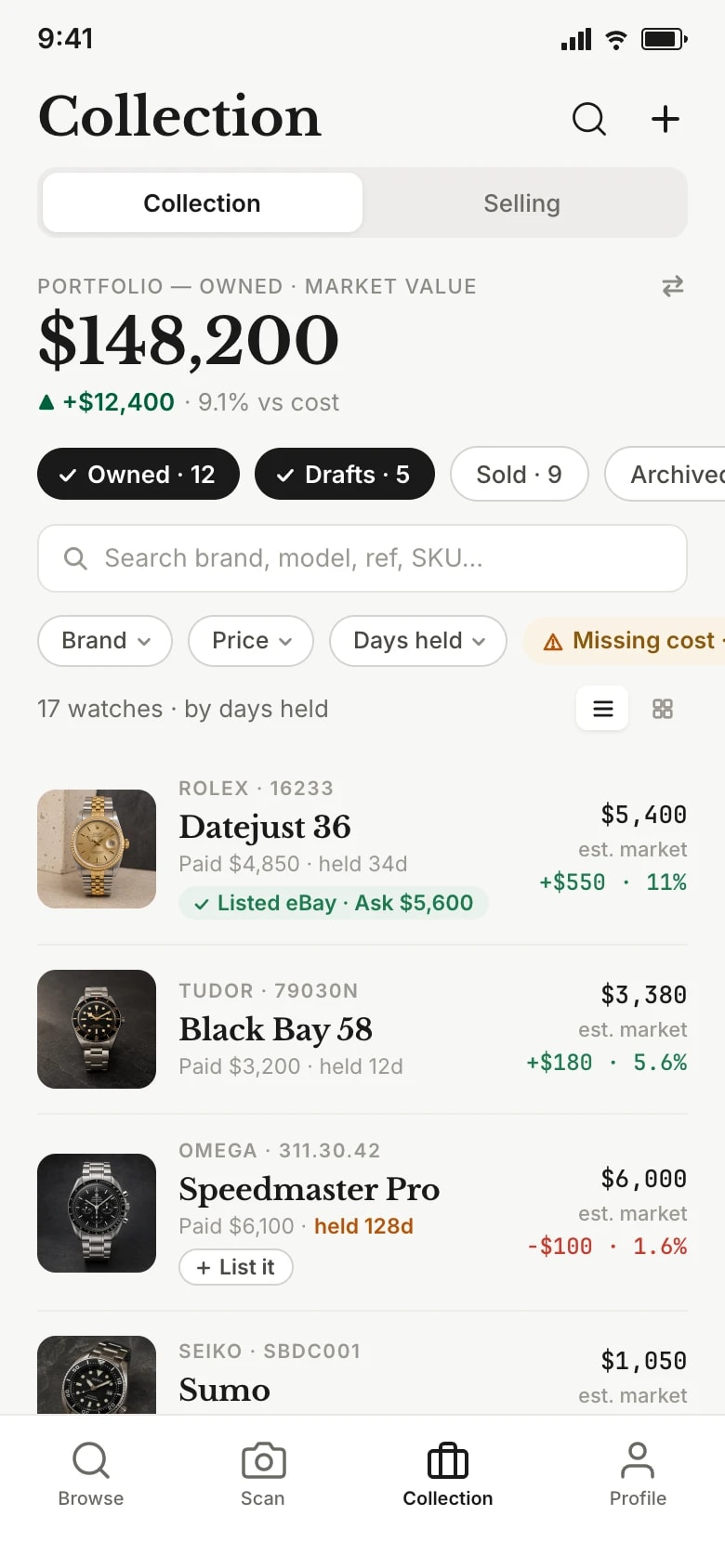
Track an inventory collection with portfolio value, watch status filters, and market changes.
Connected collection record
05Available now

Record purchase and additional costs

Keep purchase, service, shipping, and other costs attached to the watch record.

Outcome

A traceable cost basis that explains what is invested in the watch.

Open the steps
  1. 01Enter the purchase amount on the watch record.
  2. 02Add later costs such as service, parts, or shipping.
  3. 03Check the total invested before revisiting the selling plan.
Explore Inventory
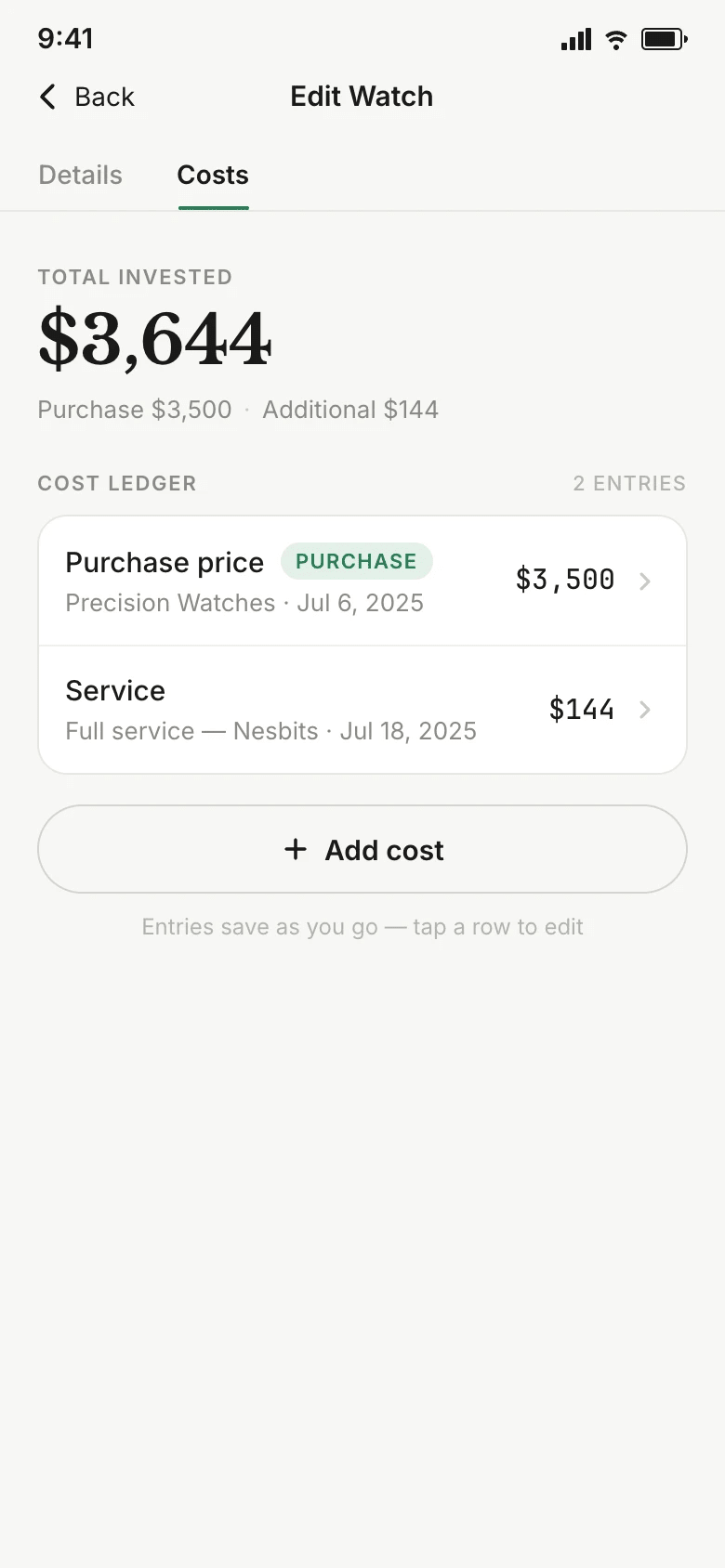
Record purchase and service costs in a watch inventory cost ledger with a total invested summary.
Watch cost ledger
06Available now

Prepare and manage a listing

Build a listing from the watch record, then keep the active price, offer controls, and channel state in view.

Outcome

A ready-to-review listing with its pricing choices and channel state connected to the watch.

Open the steps
  1. 01Bring verified watch details into listing preparation.
  2. 02Add condition evidence, photos, and checked buyer-facing copy.
  3. 03Set price and offer controls, then monitor the active channel state.
Explore Selling
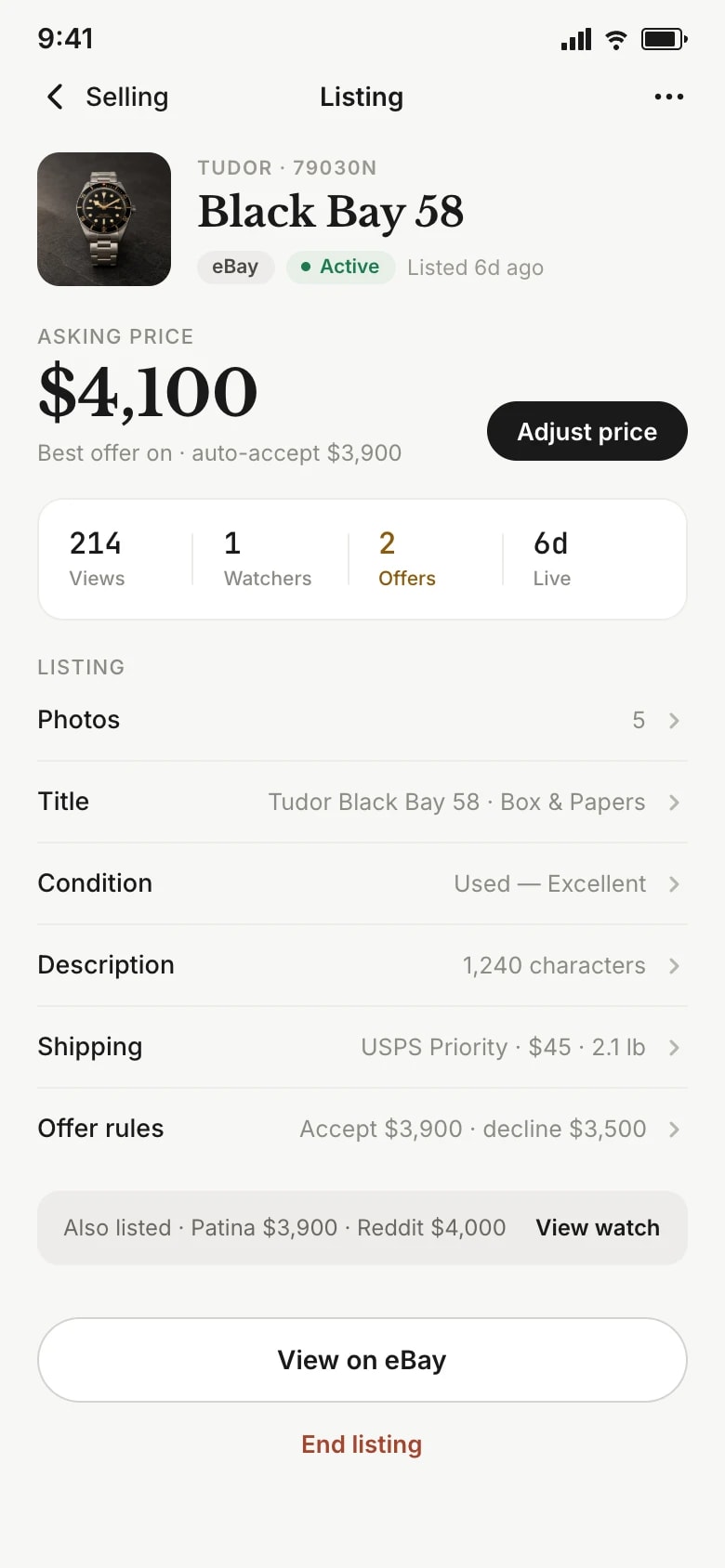
Manage an active eBay watch listing with pricing, offer rules, telemetry, and channel links.
Active listing controls and channel state
07Available now

Record a sale and inspect net profit

Connect a sale with fulfillment, channel deductions, recorded costs, and a watch-level net result.

Outcome

A sale record that makes the path from listing to net profit inspectable.

Open the steps
  1. 01Mark the listing’s sale and follow its fulfillment state.
  2. 02Review channel fees and the costs already recorded on the watch.
  3. 03Inspect the resulting profit and loss as a record of that sale.
Explore Selling
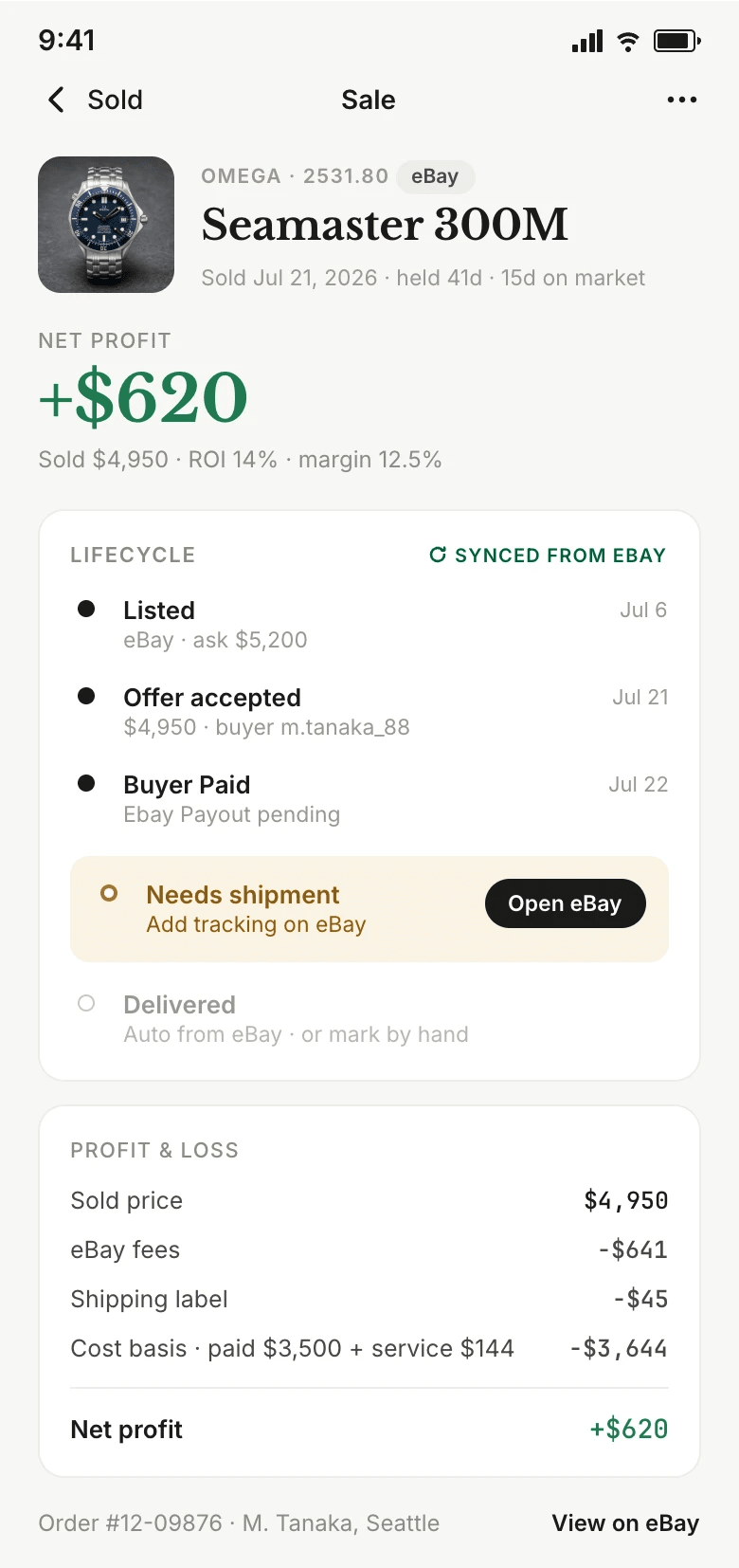
Follow an eBay watch sale from listing through shipment while reviewing the complete profit and loss.
Sale and fulfillment
Follow an eBay watch sale from listing through shipment while reviewing the complete profit and loss.
Fees and profit and loss
08Available now

Review business analytics

Review completed sales, inventory position, deal performance, and operating costs in one business view.

Outcome

An operating view that traces business results back to recorded watch activity.

Open the steps
  1. 01Read sales volume beside net profit for the selected period.
  2. 02Review invested capital, inventory value, and aging stock.
  3. 03Trace deal and operating-cost signals back to the underlying records.
Explore Analytics & P&L
Analyze watch sales with a net profit and capital overview.
Profit and capital overview
Analyze watch sales with inventory age and dead stock modules.
Inventory and aging
Analyze watch sales with deal performance and operating cost modules.
Deals and operating costs
09Available now

Measure watch health

Capture timegrapher readings and compare them with the watch’s own history to inform the next service conversation.

Outcome

A recorded measurement history that supports observation, not professional diagnosis.

Open the steps
  1. 01Record a timegrapher measurement for the watch.
  2. 02Review rate, beat error, and amplitude as readings.
  3. 03Compare the capture with prior history before deciding what to investigate.
Explore Watch Health
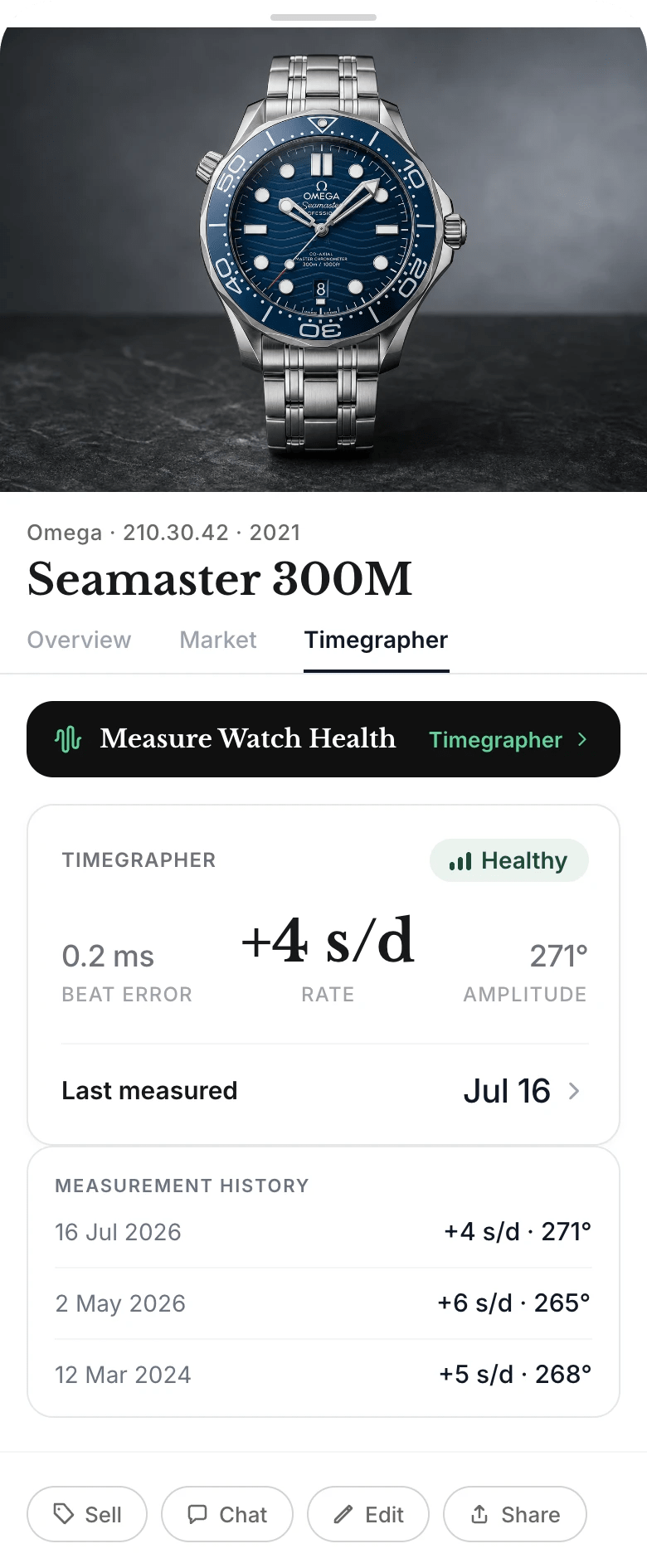
Measure an Omega Seamaster watch rate, beat error, amplitude, and timegrapher history.
Current timegrapher readings
Measure an Omega Seamaster watch rate, beat error, amplitude, and timegrapher history.
Measurement history

Start with the watch

Keep the next decision close to the record.

Bring Patina AI to the watch in front of you, then use the product views to keep its next decision grounded.